Build a Smart HR Leave Review Chatbot with n8n + AI Agent
Streamline employee leave requests with a no-code chatbot powered by n8n subflows, Google Sheets, and OpenAI.
Key Features
Everything you need to run a professional HVAC service business online
Chat with Your Leave Data
Let HR teams ask natural questions like 'Show me all pending leaves in November 2024' and get real-time answers.
Subflows for Reusability
Modular sub-workflows using 'Execute Workflow' node make it scalable, debuggable, and DRY.
Google Sheets Integration
Connects to your Google Sheets leave tracker and filters records dynamically based on user query.
AI Query Understanding
AI Agent parses natural language queries into filters like status, date, and employee fields.
Open Source & Extendable
Fork the full workflow on GitHub and adapt it to your own HR, finance, or operations datasets.
Real-World Use Cases
Used to analyze manager behavior, detect errors, and track sick leave patterns at scale.
How It Works
This workflow uses subflows, AI, and Sheets to deliver accurate answers from HR data in natural language.
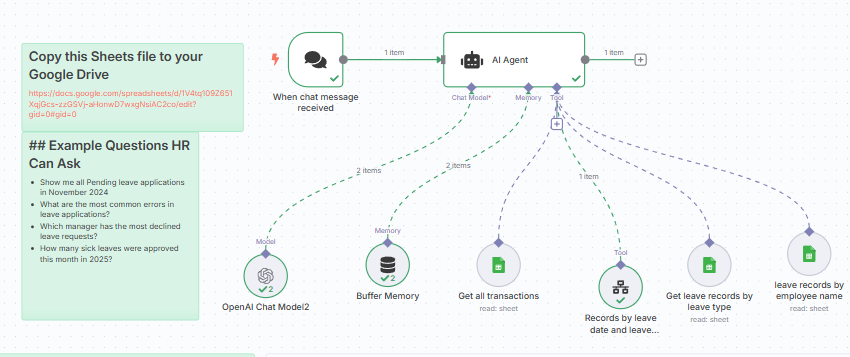
AI Agent + Memory + Sheets
Main chatbot flow includes AI Agent that receives question, stores context, and invokes subflows.
Reusable Subflows
Sub-workflows use filtering, transformation, and aggregation to return JSON-formatted responses.
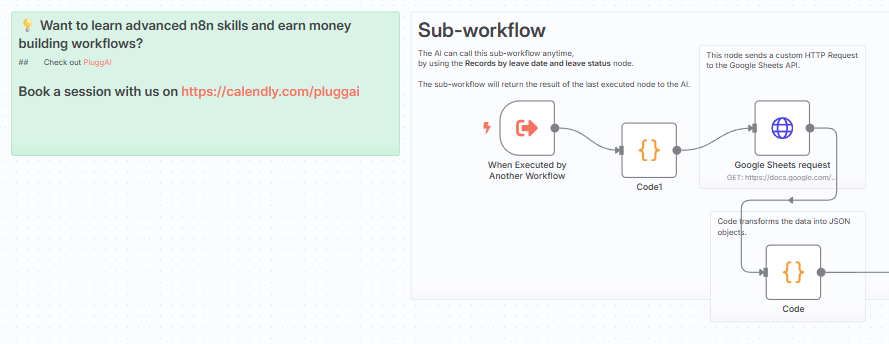
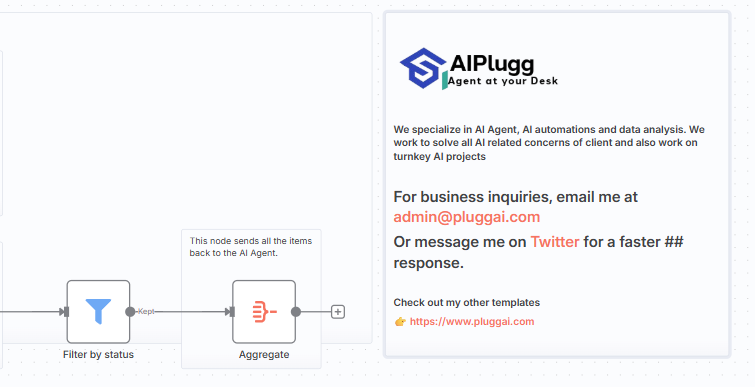
Clean Summaries for HR
Each response is human-readable and directly usable for HR review, Slack alerts, or analytics.
Connect Your Sheet
Make a copy of the [Google Sheets template](https://docs.google.com/spreadsheets/d/1vTt4x10920561XqJgsZ-gcS5AY-uEwnwD7wyqsNiaZCoze/edit) to begin tracking employee leave records.
Authenticate with Google Sheets
Set up OAuth2 credentials in n8n and link your sheet to allow read/write access for the bot.
Customize Filters
Use subflows to filter leave records by date, leave type, employee, or approval status based on the AI’s parsed query.
Train the Bot to Understand Questions
Allow users to ask HR-style questions like 'Who has the most pending leave?' or 'Show all sick leaves this week.'
Generate Reports or Alerts
Build summaries and alerts using the Sheets + Gmail + Slack nodes to notify managers or HR based on thresholds or triggers.
Deploy Across Channels
Integrate the chatbot into Slack, Telegram, or any internal system using the webhook and response node setup.
Choose Your Workflow Package
Standard – Base Workflow
Download the complete Employee Leave chatbot n8n workflow and customize it for your org.
- .json file for full chatbot flow
- 1-O-1 Tutoring
- Subflow for querying Sheets
- Buffer memory + AI Agent integration
- Customizable prompts
- Email support
Premium – With Visual Guide
Get everything in Standard plus detailed visual diagrams and Slack integration walkthrough.
- Includes everything in Standard
- One-on-One Zoom/Meet call (1 hour)
- Google Drive integration setup
- High-res image maps and flow chart
- Priority email support
- Bonus HR questions prompt guide
Custom
Includes everything plus a 1-on-1 Zoom setup call and custom workflow walkthrough.
- Premium plan features
- 1-on-1 workflow guidance
- Custom subflow tweaks for your Sheet
- Follow-up support email
- Optional deployment to Slack or Teams
What Our Customers Say
Real experiences from professionals using our platform
"It’s like having an HR analyst available 24/7, but built with n8n. Brilliant work!"
Devika M.
HR Ops Lead
"Loved how subflows kept it modular – made it easy for us to reuse parts elsewhere."
Sameer T.
Workflow Engineer
"I finally understood Execute Workflow thanks to this example. Definitely recommend!"
Angela R.
Automation Learner
Frequently Asked Questions
Find answers to common questions about the Complete HVAC Booking Website